
Hi again,
This term we will try something a little different, you have to register at the beginning of each half term to join the club. Registration
We have 23 spaces available; so please register quickly before the places go.
***********************************
There are now 2 ways to register your child for the club.
1) Online Registration.
Just send an email to the address registration@mscc.fr with the following details:
First and Last name of Club Member:
Form:
Email address of Club member:
2) Collect a Registration form from the reception.
Fill it in and drop it back before 7th September.
***********************************
Monday, August 27, 2007


Ready to Come Back to School??

Hi everyone,
I hope you have all had a great holiday and are thinking about preparing for this terms Computer Club!
The club will run as Every Monday after school 16h30 until 17h30.
Below are the dates that the Computer Club will run:
10th September
17th September
24th September
1st October
8th October
15th October
22nd October
HALF TERM (Friday 26th October- Sunday 4th November).
5th November
12th November
19th November
26th November
3rd December
10th December
17th December
CHRISTMAS HOLIDAY (Friday 21st December – Sunday 6th January).
I would recommend everyone to bring each week to the club a USB key. You will be able to copy your work to it and continue it at home.

See you all soon.
Thursday, June 21, 2007
Where will you be next Monday??
We will all be having a bit of an 'End of Year' Party next week during the club..

... so make sure you all turn up to enjoy the food and drink.

Sports Block - Part of the Mougins School Challenge'
Hi all so try and design the following building for next week, good luck.


Tuesday, June 19, 2007
Winner of the Science Block Challenge!
The Science Block challenge was won by Victor and Lucas, as you can see its great!!

Lets hope we can design the whole school, with this amount of detail. I am really impressed well done!!

Lets hope we can design the whole school, with this amount of detail. I am really impressed well done!!
Thursday, June 14, 2007
Winner of the Tree Challenge!
The Tree Challenge was between Tamara and Lucie in the Club. Lucie won the challenge, well done girls.


Sunday, June 10, 2007
11th June 'Mougins School Challenge'
Hi everybody,
I hope that after one week off you are ready for some more challenges??

We will be trying to design our school using Sketchup just until the end of term.
Goodluck!!!
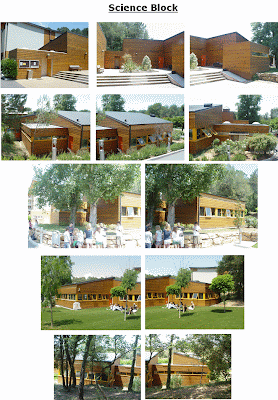
The first Challenge will be to design the Science Block, have fun!
I hope that after one week off you are ready for some more challenges??

We will be trying to design our school using Sketchup just until the end of term.
Goodluck!!!
The first Challenge will be to design the Science Block, have fun!

Monday, May 28, 2007
MSCC CLOSED - 4th JUNE 2007
The Computer Club will not run next week, 4th June 2007.

I am sorry for any inconvenience. See you all the week after!

I am sorry for any inconvenience. See you all the week after!
Thursday, May 24, 2007
Winner of the Drinks Challenge!


The drinks challenge was won by Victor, with his amazing entry, not only did he meet the challenge he went even further with his design, FANTASTIC! Well done!

Sunday, May 20, 2007
New Challenge!!!

The next challenge is slightly different, you will have 2 weeks to complete it, so the deadline will be the 4th June.
You have to design a Tree!!
These are the following rules:
1) You have to design the tree and all componants yourself, NO CHEATING.
2) No downloading trees already designed off of the internet.
3) Try to make the tree look as real as possible.
For some ideas take a look in the Google sketchup 3Dwarehouse:
http://sketchup.google.com/3dwarehouse
See you all tomorrow!
21th May - 'Drinks Challenge'

Hi all,
This Monday we will be looking at all the entries for the "Drink Challenge" and will be giving the prize to the best one.
Good luck!
Tuesday, May 15, 2007
Winners of the Rubik's Cube Challenge

The challenge was a small one between two club members only.
It was very close between Victor and Nils, Nils the overall winner due to his entry being of equal dimensions and Victor comming second with a great effort. Well done to both of you.

Sunday, May 13, 2007
14th May - New Challenge !
Hi all,
So on Monday we will be looking at all your entries for the "Rubik's Cube Challenge" and will be giving the prize to the best one.

This week’s challenge is to try and create a drink using Google Sketchup.
These are the following rules:
1) The drink has to have liquid inside.
2) You have to design it using realistic colours.
3) There has to be a straw.
See you all tomorrow!
So on Monday we will be looking at all your entries for the "Rubik's Cube Challenge" and will be giving the prize to the best one.

This week’s challenge is to try and create a drink using Google Sketchup.
These are the following rules:
1) The drink has to have liquid inside.
2) You have to design it using realistic colours.
3) There has to be a straw.
See you all tomorrow!
Monday, May 07, 2007
7th May - Rubik's Cube Challenge.
Your mission if you are willing to accept is to create the following cube using Google Sketchup.

These are the following rules:
1) The Cube has to be 3D.
2) Each side has to be made of 16 smaller squares.
3) Each smaller square must be colored in separately.
4) Each square has to be of equal dimensions.
Next week there will be a prize for the best one that meets the above criteria.
Good luck everyone.

These are the following rules:
1) The Cube has to be 3D.
2) Each side has to be made of 16 smaller squares.
3) Each smaller square must be colored in separately.
4) Each square has to be of equal dimensions.
Next week there will be a prize for the best one that meets the above criteria.
Good luck everyone.
Saturday, May 05, 2007
7th May - Google Sketchup
So there were less people last week due to the Spring Concert. But for those who were there, your houses were great.
This Monday there is a Sports Day, so I am not sure how many there will be, but Ill be there after school.
This week we will be spending more time on your house, adding a porch, terrace and coloring it in with real looking bricks.


We will be working on the 3rd + 4th tutorials, "Start Drawing part 2 + 3"
Hope to see you all there!
This Monday there is a Sports Day, so I am not sure how many there will be, but Ill be there after school.
This week we will be spending more time on your house, adding a porch, terrace and coloring it in with real looking bricks.


We will be working on the 3rd + 4th tutorials, "Start Drawing part 2 + 3"
Hope to see you all there!
Monday, April 30, 2007
Where are the Sketchup Tutorials?
To help you on your discovery of Google Sketchup there will be self paced tutorials in your MSCC folder.
Where is this folder I hear you say?
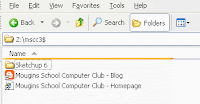
To find them, open “My Computer”, then you will see your MSCC folder. Inside you will find a folder called “Sketchup 6”, and inside are the tutorials. You also have links to the MSCC website and our Blog.
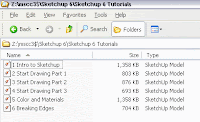
This week we will be looking at the first 2 tutorials, "Intro into Sketchup" and "Start Drawing part 1"
Where is this folder I hear you say?

To find them, open “My Computer”, then you will see your MSCC folder. Inside you will find a folder called “Sketchup 6”, and inside are the tutorials. You also have links to the MSCC website and our Blog.

This week we will be looking at the first 2 tutorials, "Intro into Sketchup" and "Start Drawing part 1"
30th April - Google Sketchup
So today is the beginning of our new project. The program you will be using is called Google Sketchup. Google Sketchup is a powerful tool for creating, viewing, and modifying 3D ideas quickly and easily.
To get started, create a shortcut of Google Sketchup on your desktop. Now we can begin!!
By the end of today’s session, hopefully you would have created the following:
1) A rectangle/square abstract art sculpture.

2) A basic house shape.

Remember to save your work each time, save the first one as “Art” and the second as “House 1”
Have fun.
To get started, create a shortcut of Google Sketchup on your desktop. Now we can begin!!
By the end of today’s session, hopefully you would have created the following:
1) A rectangle/square abstract art sculpture.

2) A basic house shape.

Remember to save your work each time, save the first one as “Art” and the second as “House 1”
Have fun.
Friday, April 27, 2007
Paint.net - Calendar
Hi all,
Just to let you know that I do not have the following months for the calendar.
January ---> Tristan, Victor, Lucas
February ---> William
May ---> Timo
July ---> Sam
November ---> Nina
Thank you to everyone who has completed their month of the year!!
You can try to design another month from above just incase they do not get done.
Have a good weekend, C U Monday.
The MSCC website is almost finished!
Just to let you know that I do not have the following months for the calendar.
January ---> Tristan, Victor, Lucas
February ---> William
May ---> Timo
July ---> Sam
November ---> Nina
Thank you to everyone who has completed their month of the year!!
You can try to design another month from above just incase they do not get done.
Have a good weekend, C U Monday.
The MSCC website is almost finished!
Friday, April 13, 2007
Last week to finish your Calendar

Friday 13th April
So I hope you are all enjoying the Easter holidays! Only a week left, aaahh where does the time go??
So the first Monday of the club (23th April) will be the last week we will work on the calendars. So make sure that we look at them together, you will have a couple of weeks to complete it at home, if you need the extra time.
REMEMBER
The size should be 1300 X 1000 Pixels.
Below is a list of who is doing what month, any problems come see me.
Front Cover ---> Nigel
January ---> Tristan, Victor, Lucas
February ---> William
March ---> Alex
April ---> David
May ---> Timo
June ---> Samuel
July ---> Sam
August ---> Nils
September ---> Tamara
October ---> Jules
November ---> Nina
December ---> Lucy
Subscribe to:
Posts (Atom)

